To turn a recipe into a grocery list, share it to Grocery List from the iPhone share sheet. The app reads the ingredients and shows them to you to check, and the ones you keep go on your list. It works with TikTok and Instagram posts and YouTube videos whose caption or description lists the ingredients, and with most recipe websites (those that publish their recipe in the standard schema.org format). Recipe import is part of Premium, a one-time purchase (one payment, no subscription).
1. Share the recipe
In TikTok, Instagram, YouTube or Safari, tap Share and choose Grocery List. You'll see "Content shared to Grocery List." Tap Close.
2. Open Grocery List
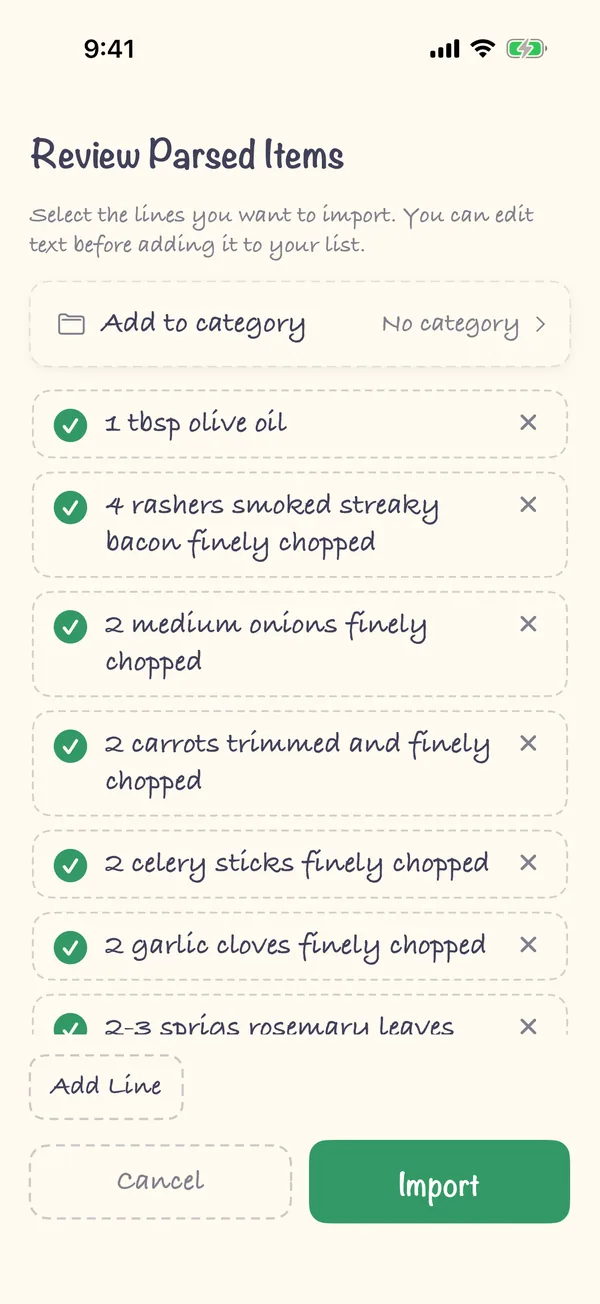
Open the app. It fetches the recipe and opens Review Parsed Items with one line per ingredient.
3. Check the ingredients
Every line starts out selected. Tap a line's circle to leave it out, tap its text to edit it, or tap × to remove it. Add Line adds anything that's missing, and Add to category puts the lot in one category, such as Produce.
4. Import
Tap Import and the ingredients go on your list.
FAQ
Which apps and sites does it work with?
TikTok, Instagram and YouTube, when the ingredients are written in the caption or the video description, and most recipe websites. A recipe website works when it publishes its recipe in the schema.org Recipe format, which most large recipe sites do.
Why does it say "Nothing to import"?
The post or page didn't share any ingredients with the app. Instagram, for example, doesn't always pass the caption on, and some videos only say the ingredients out loud. Take a screenshot of the ingredients and share the screenshot to Grocery List instead: the app reads the text in the image.
Is it free?
Importing from a link (TikTok, Instagram, YouTube or a recipe site) is part of Premium. Sharing a screenshot or plain text to the app isn't. Premium is a one-time purchase that belongs to your Apple ID, so it works on every device you sign in with.
Does it add everything in the caption?
No. The app drops links, hashtags, "link in bio" lines, discount codes, nutrition facts and video timestamps, and you check every line before anything is added.
Can I see the recipe steps in the app?
No. Grocery List takes the ingredients for your shopping list. The method stays in the original post or page.