To organize a grocery list by aisle, group items into the sections your store is laid out in (produce, bakery, dairy, meat, pantry, frozen, household) and put the sections in the order you walk through the store. Then you go through once, top to bottom, without doubling back for the thing you missed. On iPhone, Apple Reminders can sort a Groceries list into sections automatically. In a grocery list app such as Grocery List, you make your own categories and add each item to one.
1. Pick your sections
Start with the sections your store actually has. A typical supermarket, in walking order:
- Produce
- Bakery
- Meat and seafood
- Dairy and eggs
- Pantry: pasta, rice, canned goods, oil, spices
- Frozen
- Household and toiletries
Fewer, bigger sections work better than many small ones. You want each item to have one obvious home.
2. Put them in the order you walk
Stores differ, so walk through your usual one once and note the order. Frozen is often last on purpose, so it stays cold on the way home.
3. File each item under a section
On paper: fold the page into boxes, one per section, in walking order.
In Apple Reminders: make a list with the type set to Groceries. Items are sorted into sections as you add them, and you can drag one to another section if it guessed wrong.
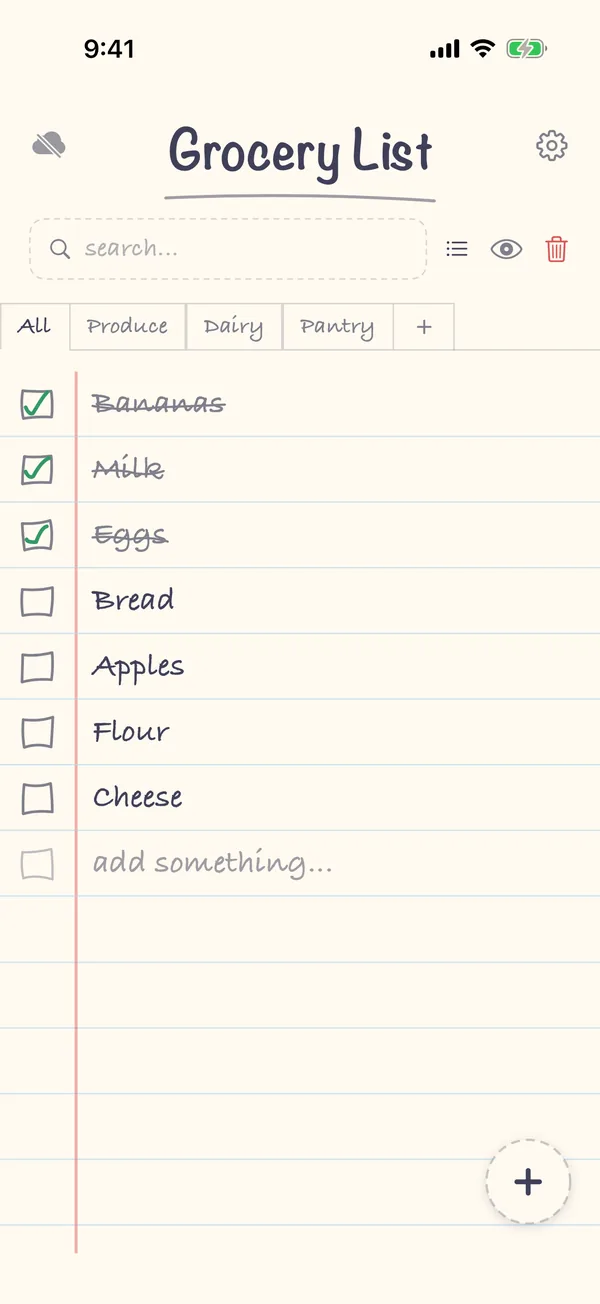
In Grocery List: your categories appear as tabs along the top of the list. Tap + in the tab bar to add one, or manage them in Settings → Manage Categories. Choose a category tab before adding, and new items go into it.
4. Shop section by section
At the store, work through one section at a time and check items off as they go in the cart. Whatever is left when you reach checkout is what you missed.
FAQ
Should I use exact aisle numbers?
Only if you always shop at the same store. Aisle numbers change between stores and after a refit. Sections like "dairy" and "frozen" work everywhere.
What about items that could go in two sections?
Pick one and stick with it, so you always know where to look. Butter goes in dairy, even if it's next to the cheese in your store.
Can I share a list that's sorted by section?
Yes. In Grocery List, a shared list keeps its categories for everyone. You can also mark a category as private, so it isn't shared.