To turn a TikTok recipe into a shopping list, find the ingredients (usually in the caption, sometimes only spoken in the video), check what you already have, and write the rest on your list. That's quicker in an app: in Grocery List, share the TikTok to the app, and the ingredients in its caption appear as lines to check before they go on your list. The same works for Instagram, YouTube and most recipe websites.
The manual way
- Find the ingredients. Tap more under the TikTok caption. On YouTube, open the video description. If they're only said aloud, pause and write them down.
- Check your pantry. Cross off what you already have.
- Write the rest on your list, adjusting quantities for how many people you're cooking for.
- Save the recipe (TikTok's Favorites, or a screenshot) so you can follow it while you cook.
The faster way: share it to Grocery List
- In TikTok, tap Share, then choose Grocery List (you may need to tap More to find it).
- Open Grocery List. The ingredients from the caption appear on the Review Parsed Items screen.
- Uncheck anything you already have, fix anything that reads oddly, and choose a category if you like.
- Tap Import.
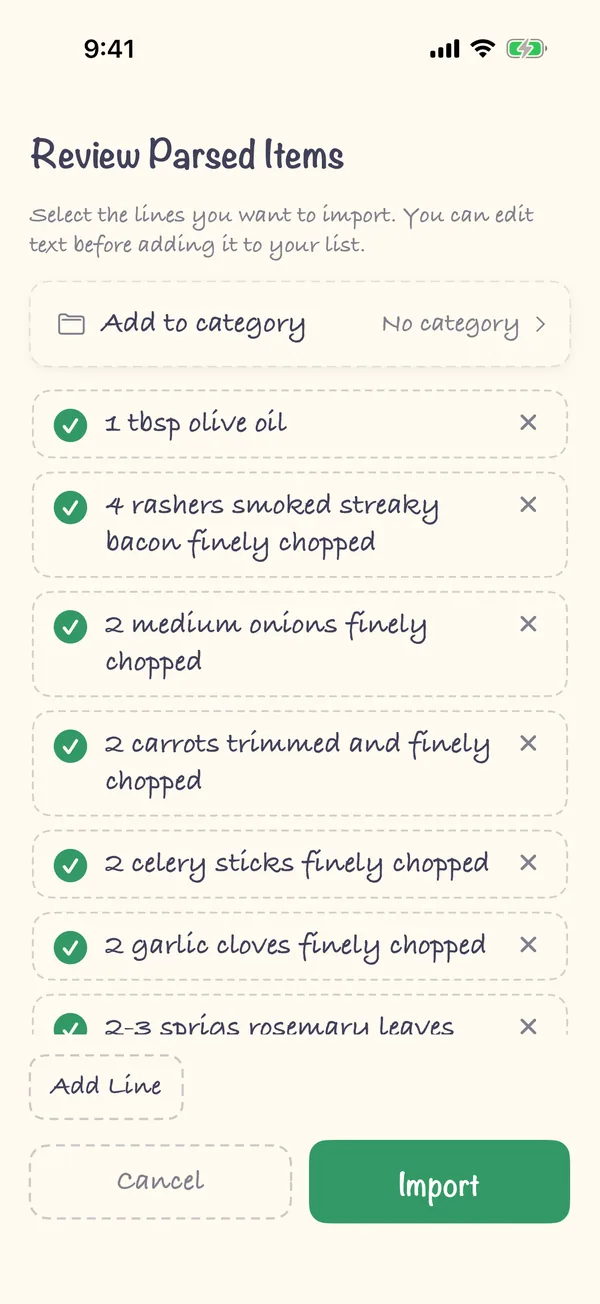
Links, hashtags, "link in bio" lines and discount codes in the caption are left out. Recipe import is part of Premium, a one-time purchase (one payment, no subscription). More on the recipe import feature page.
When the ingredients aren't in the caption
Some videos only say the ingredients out loud, and Instagram doesn't always pass its caption on to other apps. Grocery List then says "Nothing to import". Take a screenshot of the ingredients instead, from the video or the comments, and share the screenshot to Grocery List: the app reads the text in the image. Sharing a screenshot is free.
FAQ
Does it work with Instagram and YouTube?
Yes, when the ingredients are written in the post's caption or the video's description. Recipe websites work too, if they publish their recipe in the standard schema.org format, as most big recipe sites do.
Can I add several recipes to one list?
Yes. Share each one and import it. Everything goes on the same list, and you can check off or remove duplicates as you go.
Does the app save the recipe itself?
No. Grocery List takes the ingredients for your shopping list. The method stays in the original post.